
Last updated: 2026-09-22
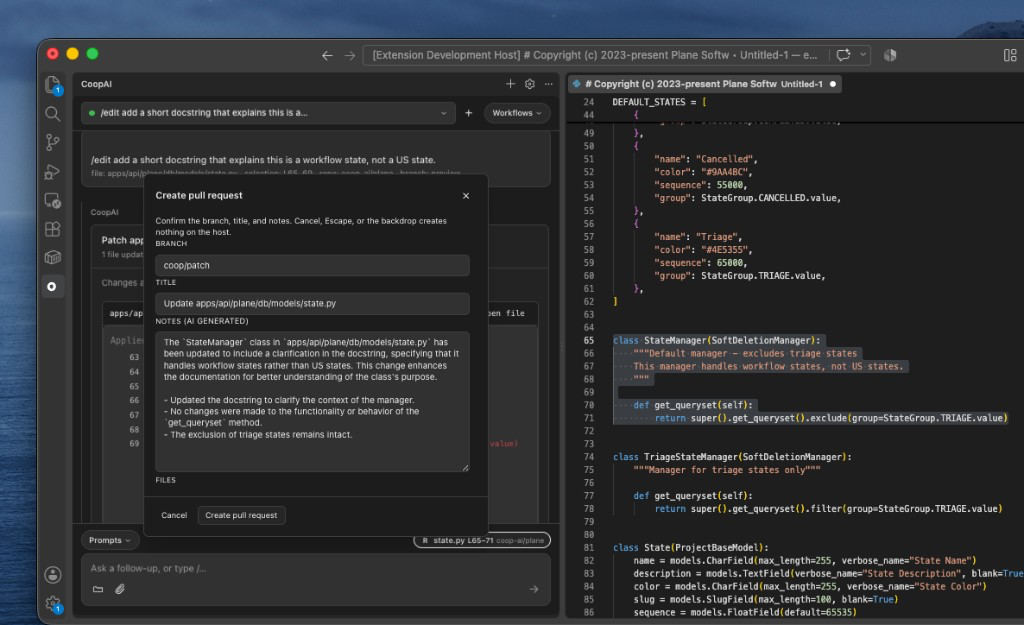
You can open a pull request for your team without leaving VS Code. Three ways — all open the same confirm step (branch, title, notes). Cancel, Escape, or clicking away creates nothing.
| Way | What goes in the PR |
|---|---|
| Create pull request on a patch card | That Apply only |
| Type Create a PR in chat after Apply | Every /edit you Applied in this thread |
| Type Create a PR in chat after editing a file | Dirty Use-repo buffers (typed, pasted, or autocomplete) — Apply is not required |
There is no /pr slash command. Chat understands everyday wording — “create a pull request”, “create a pr of the work I just applied”.
You need a Use repo. Unsaved buffers count. Cancel never creates a branch or PR. Applying an edit on a local file keeps Apply and Undo; Create pull request stays on the card but is disabled.
Open a pull request
From the editor (no /edit)
- Select the repository with Use repo.
- Open a Use-repo file and change it (type, paste, or Tab-accept ghost text). You do not have to Save.
- In Coop chat, type Create a PR.
- Review Branch, Title, Notes, and Files. Edit anything you want.
- Click Create pull request. Coop shows a link — or click Cancel if you only wanted to see the dialog.
From the patch card
- Select the repository with Use repo.
- Send
/edit <instruction>(or/patch,/fix) and click Apply. - On Patch applied, click Create pull request.
- Review Branch, Title, and Notes. Edit anything you want.
- Click Create pull request. Coop shows a link — open it to see the PR.
From chat after Apply
- Select the repository with Use repo.
- Apply one or more
/edits in the same thread. - Type Create a PR (or “create a pull request of all the work I just applied”).
- Review Branch, Title, and Notes. Notes cover every Apply in the thread, plus any dirty editor files.
- Click Create pull request. Coop shows a link — open it to see the PR.
If you have no dirty files and no Apply, chat tells you to edit a Use-repo file or Apply an /edit first.
Branch, title, and notes
Coop fills these in from the change. You can edit all of them.
| Field | Default | What it’s for |
|---|---|---|
| Branch | coop/patch | The branch for this change. Choose a new name if you already opened a PR from coop/patch. |
| Title | Update path/to/file | The pull request title. Several files become Update N files. |
| Notes (AI Generated) | Short summary of the diff | The pull request description. Optional — edit, replace, or clear. |
| Files | That card (button), every Apply in this thread (chat), or dirty Use-repo tabs (editor) | What goes into the PR |
Notes are drafted for you and labeled (AI Generated) so reviewers can tell. They describe the diff only — not tickets or tests you didn’t mention. The model is OpenAI GPT-4o mini (model assignments).
After it’s open
- Open the link to add reviewers or more description on GitHub (or GitLab / Bitbucket).
- Keep chatting in the same thread. Opening a PR does not undo the edit.
- Undo on the patch card restores the editor. It does not close the PR.
If coop/patch is already in review, change Branch so the new work gets its own PR.
GitHub, GitLab, and Bitbucket
Coop opens a pull request on GitHub or Bitbucket, and a merge request on GitLab. The button in Coop is always Create pull request.
Your org connects GitHub (or GitLab / Bitbucket) once. You use that connection from the editor.
Next steps
- Edit mode — describe a change and apply the patch
- Owner's Manual — Create a pull request