
Last updated: 2026-09-09
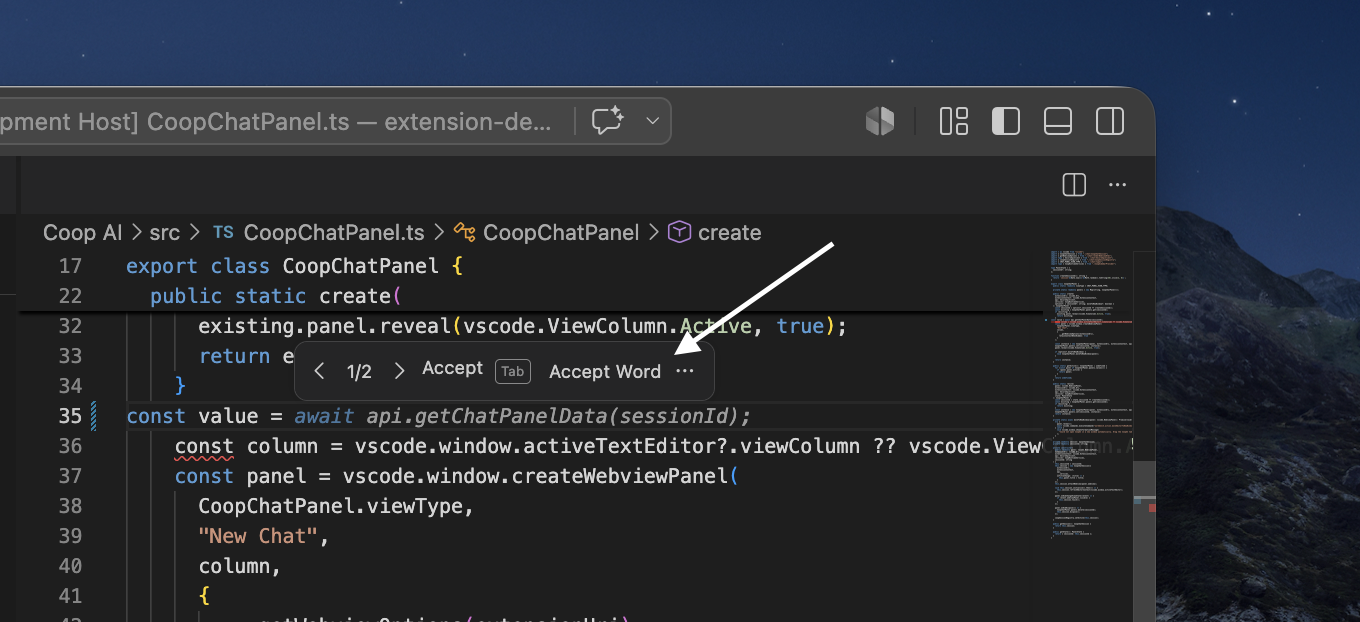
CoopAI inline autocomplete shows ghost-text suggestions as you type in the editor. Suggestions stream from the Coop API and appear via VS Code's InlineCompletionItemProvider.
The feature ships off by default (coopAI.autocomplete.enabled: false) so GitHub Copilot and other inline providers keep working until you opt in. Coop assigns Mistral Codestral for inline completions — see Model assignments. Your choice is saved globally (User scope) so workspace folders cannot silently override it.
Turn autocomplete off (or back on)
Autocomplete is controlled from Settings → Preferences → Model & chat — there is no toggle in the Coop sidebar header.
Extension UI — Settings → Preferences → Model & chat
- Open CoopAI Settings (gear icon in the sidebar title bar).
- Go to Preferences → Model & chat.
- Check or uncheck Enable inline autocomplete.
- Click Save model settings.
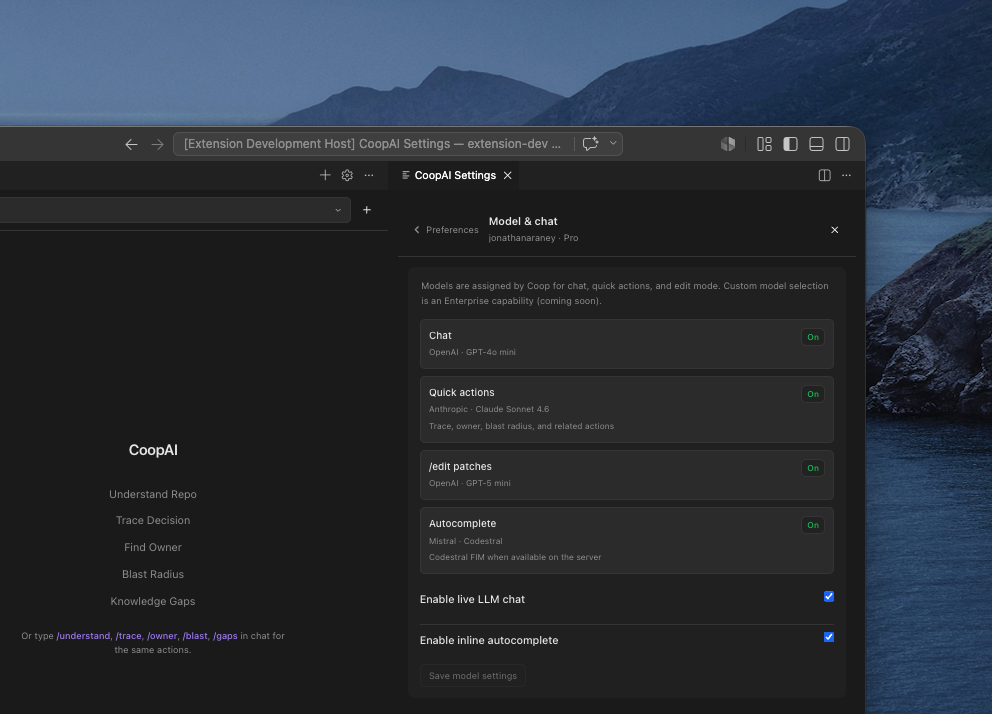
The Autocomplete row in the read-only assignment list shows On or Off based on that checkbox. Chat, quick actions, and edit mode are always on. Autocomplete always uses the assigned Codestral model and does not follow the model menu in chat — see Model assignments.
Success: With Enable inline autocomplete checked and saved, typing in an eligible file (e.g. .ts) shows ghost text after a short pause. With it unchecked and saved, Coop does not request ghost text.
File — VS Code User settings
Prefer User settings (not Workspace) so the preference stays consistent across folders:
"coopAI.autocomplete.enabled": false
Coop strips workspace overrides on activate and on Save so a folder or .code-workspace file cannot keep autocomplete on or off against your Settings choice.
Extension UI — Command Palette (optional)
Run CoopAI: Toggle Autocomplete to flip the global enabled flag without opening JSON settings.
Explicit opt-out is remembered (coopAI.autocomplete.userDisabled in extension global state) so index-discovery toasts do not re-enable autocomplete after you turn it off.
Prerequisites
- Signed in under Settings → Account (Google, email, or SSO)
- File type is supported (code files; sensitive files such as
.envare skipped)
How it works
flowchart LR
  A[Type in editor] --> B[Trigger detector]
  B --> C[Completion router]
  C --> D["POST /v1/completions/inline"]
  D --> E[SSE stream]
  E --> F[Ghost text in editor]
  F --> G{User action}
  G -->|Tab| H[Accept]
  G -->|Escape| I[Reject]
- Context extraction — Prefix, suffix, indentation, and surrounding lines from the open buffer.
- FIM (fill-in-the-middle) — When
coopAI.autocomplete.useFimistrue(default), the extension sendssegments: { prefix, suffix }. Production routing uses Codestral (Mistral) when the server has FIM keys configured; otherwise it falls back to chat-style completion. - SSE streaming — The extension requests
stream: true. Tokens arrive incrementally so ghost text can appear before the full completion finishes. - Client intelligence — Hot Streak, Smart Throttle, request recycling, and multi-line detection tune when and how requests fire.
Hot Streak
After you Tab-accept a suggestion, autocomplete stays snappy for ~8 seconds (up to 3 keystrokes). Debounce drops to 0–50 ms so the next completion feels immediate.
Smart Throttle
Debounce adapts to your typing speed and rolling p95 latency:
- Fast typing → shorter debounce
- Elevated server latency → longer debounce to avoid wasted requests
Request recycling
If you keep typing while a request is in flight, the extension reuses the in-flight request when the new prefix extends the old one, instead of firing a duplicate call.
Multi-line detection
When the cursor is after {, =>, (, or on an empty line inside a block, the client requests up to 200 tokens (vs 96 for single-line) and allows longer ghost-text spans.
Keyboard shortcuts
| Action | macOS | Windows / Linux |
|---|---|---|
| Accept suggestion | Tab | Tab |
| Reject suggestion | Escape | Escape |
| Next suggestion | Alt+] | Alt+] |
| Previous suggestion | Alt+[ | Alt+[ |
Next / previous apply only when coopAI.autocomplete.showMultipleSuggestions is true.
Run CoopAI: Show Autocomplete Help from the Command Palette for a quick reference.
Settings
| Setting | Default | Description |
|---|---|---|
coopAI.autocomplete.enabled | false | Master switch — persisted at global scope |
coopAI.autocomplete.trigger | auto | auto — debounced while typing; manual — Command Palette CoopAI: Trigger Inline Autocomplete only; off — no requests |
coopAI.autocomplete.useFim | true | Send FIM segments for Codestral routing |
coopAI.autocomplete.useGraphContext | false | Force indexed graph context on; when false, graph is still auto-attached when Deep-Index is ready (see below) |
coopAI.autocomplete.debounceMs | 300 | Pause after typing before auto-trigger (0–2000) |
coopAI.autocomplete.requestTimeoutMs | 1500 | Drop slow requests after this many ms (100–5000) |
coopAI.autocomplete.maxSuggestionLength | 200 | Max characters in one suggestion (8–500) |
coopAI.autocomplete.showMultipleSuggestions | false | Cycle distinct ranked suggestions (Alt+[ / Alt+]). Near-duplicates (` |
coopAI.autocomplete.projectImports | [] | Extra import paths to bias project-style completions |
Advanced coopAI.autocomplete.model presets exist for developer tuning; production inline routing uses the assigned Codestral model regardless. See Extension settings.
GitHub Copilot
When Coop autocomplete is on, Coop automatically disables Copilot inline suggestions (github.copilot.enable) and restores your previous Copilot setting when you turn Coop autocomplete off. No prompt — Copilot chat and other features stay available; only competing inline ghost text is turned off.
When Coop autocomplete is off, Copilot inline behavior is unchanged.
Graph context (indexed repos)
When your workspace repo is Deep-Indexed and index status is ready (SCIP or Zoekt available), Coop automatically attaches graph context to inline completions — even when coopAI.autocomplete.useGraphContext is false (the default).
- The extension sends
useGraphContext: truewithrepoIdand file path when the index is healthy - The API attaches a short slice of dependents and ownership from the indexed graph (150 ms budget)
- Available on all plans when the repo is Deep-Indexed (free orgs: up to 3 repos)
Set coopAI.autocomplete.useGraphContext to true to force graph context on regardless of index health. Leave at false for auto when indexed.
Requires a connected, indexed repo in the admin portal. Set Workspace owner/repo/branch so repoId resolves correctly.
Response header x-graph-context: degraded means the graph slice timed out or was unavailable — completion still works from buffer context.
FIM (fill-in-the-middle)
Traditional completion sends only text before the cursor. FIM sends both prefix (before cursor) and suffix (after cursor) so the model can fill the gap.
Production routing (when segments.prefix is present and useFim is enabled):
- Mistral Codestral — assigned autocomplete model (
codestral-latest) whenMISTRAL_API_KEYis configured - DeepSeek FIM — fallback when only
DEEPSEEK_API_KEYis set - Chat fallback — when FIM providers are unavailable
Set coopAI.autocomplete.useFim to false to always use chat-style message requests.
Zero-retention routing
Inline requests use a dedicated path separate from chat:
x-use-case: code-completion-only
See Zero-retention LLM routing.
Telemetry
| Event | Where | Purpose |
|---|---|---|
completion.requested | Server | Usage tracking, server-side latency |
completion.suggested | Extension | Ghost text actually shown (CAR denominator) |
completion.accepted | Extension | Tab accept (CAR numerator) |
completion.rejected | Extension | Escape or superseded suggestion |
completion.performance | Extension | Batched client p50/p95 snapshots |
Org admins can view org completion metrics in the admin portal → Completions tab. Members see personal usage on My Usage → Completions.
Suggested next-step pills in chat (suggest_chip.*, suggest_intent.*, chat_intent.*) follow VS Code's telemetry setting and are not used for Admin usage charts.
Troubleshooting
| Problem | Fix |
|---|---|
| No ghost text | Confirm Enable inline autocomplete is checked in Settings → Preferences → Model & chat and saved; sign in under Settings → Account |
| Nothing on manual trigger | Enable autocomplete first; Command Palette → CoopAI: Trigger Inline Autocomplete |
| Slow or missing suggestions | Increase requestTimeoutMs; check network; self-hosted API needs MISTRAL_API_KEY for Codestral FIM |
| Completions in strings/comments | By design — trigger detector skips comment and string contexts |
| Graph context empty | Deep-Index the repo in admin portal; confirm index status is ready in Settings → Indexing; check Workspace owner/repo/branch; set coopAI.autocomplete.useGraphContext to true to force on |
| Save unchecks, then the box checks itself | A workspace file was forcing it on. Coop now clears that on Save. Reload the Extension Host, then save again. |
More fixes: Troubleshooting.
API
Direct API usage: API reference — Inline completion.
Next steps
- Model assignments — per-feature models and settings UI
- Extension settings
- Getting started
- Edit mode —
/editpatches with apply and undo - Create pull request — open a PR from the patch card or by asking in chat